Two calendars in one
By booking date — when they bought — and by stay date — when they sleep. Many systems mix the two and confuse people.
Revenue
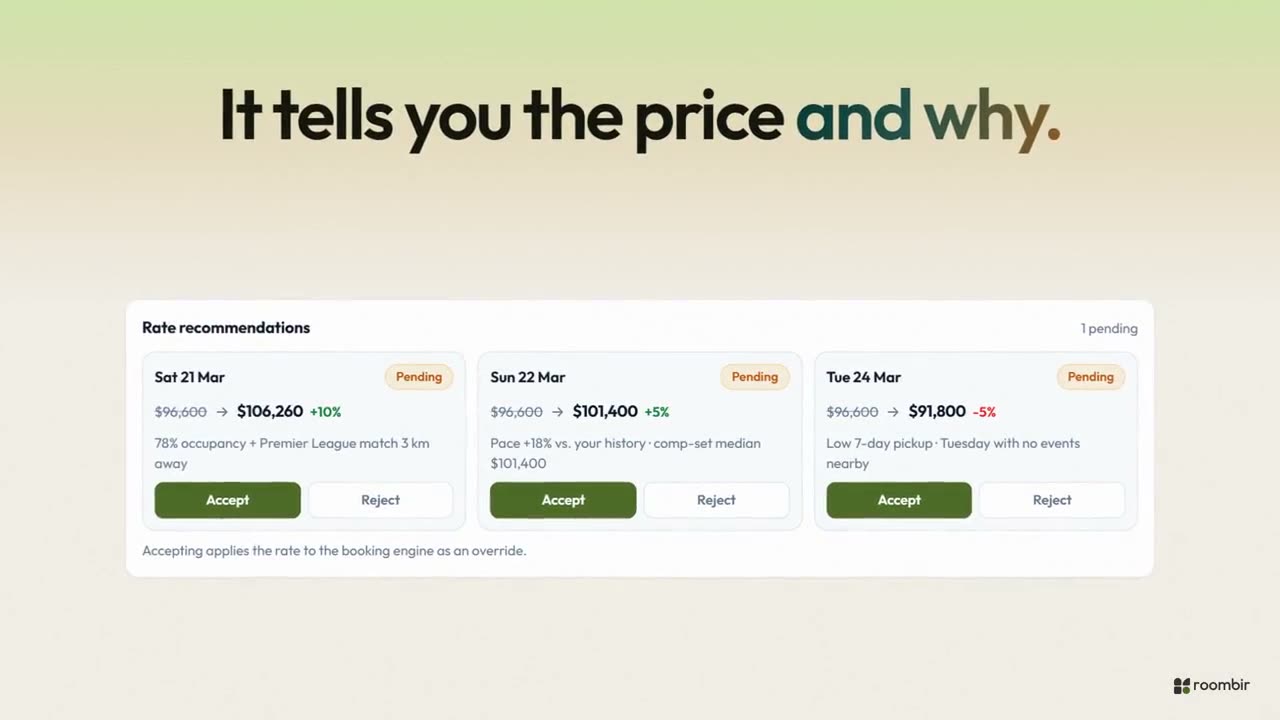
A document per date with the full trace: what data it saw, which rule matched and which cap applied. It looks at your own history and your destination — holidays, events, flight routes, weather — with the source in view. And when you accept, the rate goes into the engine on its own.
Decisions
There's a document per property and per date with the full trace: what data the system saw, what the base rate was, what it suggested, which rules matched, whether a cap applied, and a log you can read line by line.
Your destination
Demand signals come from fifteen public sources per destination, swept around your property and not from a fixed list of cities. Events get suggested on their own and you approve them: an approved one doesn't get overwritten by the next update.
Scenarios
Every rule looks at a variable, compares it against a value inside a lead-time window and applies an adjustment. They're evaluated in order and the last match wins. Before you turn any of them on, the dry run shows you what it would have done.
Competitors
Competitors who also use roombir contribute their real rate. Outside ones get discovered on their own by proximity and similarity, and you load their rate, as a fixed reference or by date.
The other tabs
By booking date — when they bought — and by stay date — when they sleep. Many systems mix the two and confuse people.
Sales pace against your own property's past, by day of week, month and lead time, with fast- or slow-selling alerts.
Suggested on their own and curated by you: suggested, approved or discarded, with a relevance score and expected impact.
Current rate, suggested rate, difference and reason. They get accepted or rejected, and can apply themselves if you turn that on.
Besides bookings, the demand index takes your engine's searches, including the ones that found no availability.
Competitors, location, hotel profile, pace thresholds, event radius and rate caps.
It is, but it will tell you so. Pace is compared against your own history, grouped by day of week, month and lead time, and the screen shows the sample size. If a cell was calculated from three bookings, you'll see it. We'd rather do that than show you a confident-looking curve built on nothing.
From two places. If the competitor also uses roombir, the rate is real. If it's external, the system discovers it on its own by location and similarity, but you load the rate, fixed or by date. The connection to automatic providers is prepared and not yet connected; we won't tell you it is until it's true.
No. Once you accept it, the rate goes into the booking engine and becomes the first rung of the price for that date. In most systems that step is a person copying a number from one screen to another.
Revenue starts being useful as soon as you have history of your own, and while you don't, it says so to your face instead of inventing a curve.
01You load the inventory and base rates.
02You build your comp set and approve the events in your area.
03You write two or three rules and dry-run them.